- Published on
AI learning journey step 4 : First notions about MCP servers
- Authors
- Name
- Ismail Tlemcani
- @Ismailtlem
We continue our journey in learning AI concepts, at least the important ones (this is going so fast :D). In this blog post, we'll see a new buzz word that we hear a lot about : MCP. This is just the first post that summarizes some first notions to know about MCPs. There might be more blog posts about this topic in the future, as I learn more about it. The content in this blog post is mostly inspired from those 2 sources :
What is an MCP ?
To put it simply, MCP is a protocol like HTTP, and it is used for connecting AI applications (like Claude, ChatGPT) to external tools or resources (like an external app, an external database, ...).
What are the benfits of MCP servers ?
In general, an AI application (like claude, or chatgpt) is as performant as the tools and resources and data it can access. It cannot process any action on a system that it cannot access. Also, it is generally trained on a limited and public set of data. It you want it to access your private data, it won't be able to do it without any proper integration.
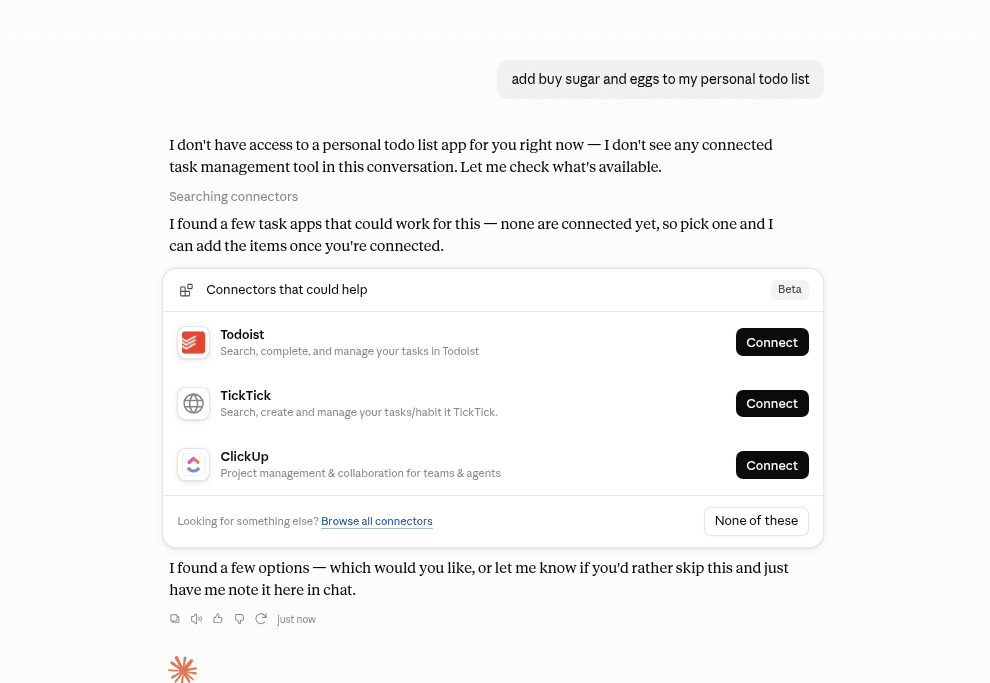
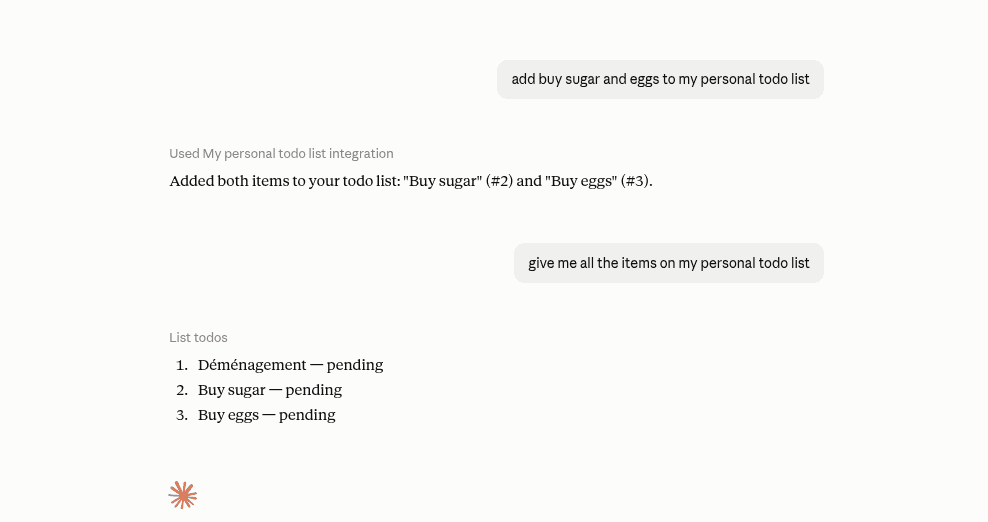
You'll find, in the image below, a very simple example that shows the purpose of using an MCP server. Imagine, you want to just add your TODO list items directly from your AI favorite app. Without any MCP integration, the AI app (claude in this example) doesn't know how to connect to get our TODO list items.
If we make a simple MCP server, and we connect it to the AI app we are using, the AI app will be able to connect to our TODO list app and get the items we want, like shown below
Concepts in MCP
MCP architecture
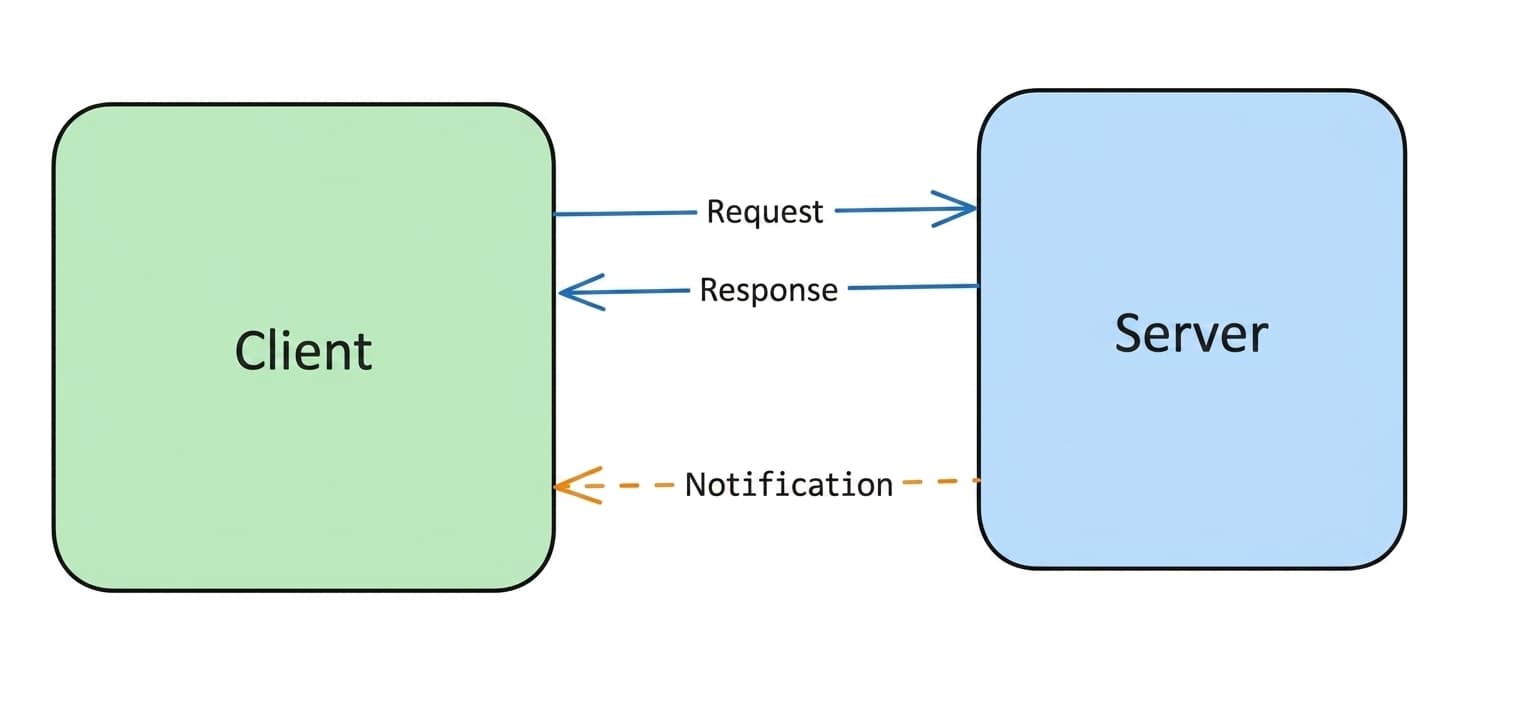
MCP follows a client-server architecture that is very common in software development. An MCP host, which is an AI application like Claude Code or ChatGPT, make requests to one or many serverss
In summary, there are 3 components that participate in this architecture:
- A host : It is the main AI app that the user is interacting with (like claude desktop, or chatgpt).
- A client : A software component inside the host, that is responsible for connecting and communicating with the server, which have access to the tools or the resources we want.
- A server : An external software, hosted either on the same machine as the host, or on a remote machine. It exposes the tools and resources the client want to have access to.
MCP primitives
This is just a fancy word in MCP world, but it is important to understand what it means.
MCP Primitives define just what does the server expose to the client. Those are :
- tools : which are functions that an AI model can use to perform an action or compute a value.
- resources : which are simply just read only data that the AI model can access to
- prompts : Prompt templates or workflows that guide the workflow between the user, the AI model, and the available capabilities.
How these components interact with each other ?
In this section, we'll see briefly how these components interact with each other in a typical user interaction.
The first step is the user interacting with the AI application, typically by entering an input.
The Host analyzes the user’s input, it uses a model to try to understand the request, and then determine if it might need any external capabilities.
If it needs any external resources or tools, the Host connects with its Client component, and ask the client to connect to the configured servers.
The Client then queries the server to discover what capabilities (Tools, Resources, Prompts) it has.
Based on the user’s input, the Host formulates a request to the Client, specifying which capability it wants to invoke and any necessary parameters.
The Server processes the needed functionality and returns the results back to the client.
The Client forwards the results to the Host, which then uses them to generate a response for the user.
Communication protocol
At its core, MCP uses JSON-RPC as the base protocol of communication between clients and servers.
Requests
Requests sent from client to servers looks like this :
{
  "jsonrpc": "2.0";
  "id": string | number;
  "method": string;
  "params?": {
    [key: string]: unknown;
  }
}
Here is an example :
{
  "jsonrpc": "2.0",
  "id": 1,
  "method": "tools/call",
  "params": {
    "name": "weather",
    "arguments": {
      "location": "San Francisco"
    }
  }
}
Responses
Those are sent from the server to the client. A Response message includes:
- The same id as the corresponding Request
- Either a result (for success) or an error (for failure)
{
  "jsonrpc": "2.0";
  "id": string | number;
  "result": {
    [key: string]: unknown;
  };
}
Here is an example :
{
  "jsonrpc": "2.0",
  "id": 1,
  "result": {
    "temperature": 62,
    "conditions": "Partly cloudy"
  }
}
Conclusion
In this first blog post, we just saw some first concepts about MCP servers : what it is, why do we care about it and its core architecture components. In the next blog post, we will try to implement an MCP server, and connect it to an AI app like Claude. I'm myself learning about this topic, and I am just sharing what I am learning. Do not hesitate to reach out if you have any questions or if you have knowledge to share about this topic. I will be happy to learn from you.